
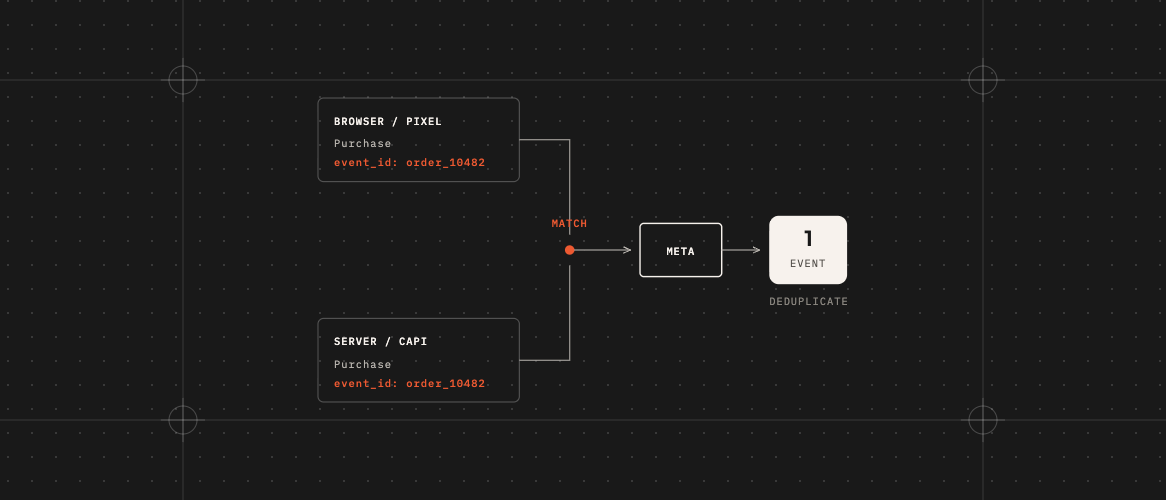
Short answer: In the Meta Pixel vs Conversions API question, Meta recommends using both. The Meta Pixel tells Facebook about a sale from your visitor’s browser. The Conversions API tells Facebook about the same sale from your website’s server. Because the sale is reported twice, each report needs the same event name and the same event ID. When they match and arrive within 48 hours, Meta generally counts them as one sale.
What is the Meta Pixel?
A small piece of code on your website. When someone buys or fills in a form, it tells Facebook and Instagram. Meta and many website platforms offer guided setup, but it runs in the visitor’s browser, so ad blockers, privacy settings, and people saying no to cookies can stop it.
What is the Conversions API?
A way for your website itself (not the visitor’s browser) to tell Meta about a sale. Browser ad blockers don’t affect it, but it doesn’t get around consent rules: you still need permission where the law requires it. It can fill in sales the Pixel misses, as long as your server knows about the sale and your consent rules allow sending it. A common way to send it is server-side tracking.
Meta Pixel vs Conversions API: why use both?
The Pixel misses some sales. The Conversions API can catch some of those. Together, Meta sees a fuller picture. That helps it show your ads to people more likely to buy. Meta’s own Conversions API guide recommends running them together.
Why sales can get counted twice
If both send the same sale and nothing links them, Meta sees two sales. Your reports look better than reality, and Meta learns from wrong information.
The fix is simple to describe: give each sale one shared ID, like the order number, and send it from both places with the same event name (for example “Purchase”). Meta matches the two and keeps one. Meta also accepts matching on event name plus the fbp cookie or external ID.
Common mistakes
- Each side makes up its own ID, so they never match.
- The event has a different name on each side.
- An app or plugin adds the Conversions API, but the old Pixel code is still there without the shared ID.
- Two different apps both send sales to Meta, so the same sale arrives three times.
FAQ
Do I still need the Pixel if I have the Conversions API?
Meta recommends using both. If you only send an event from one place, you don’t need to match anything.
How do I know if it’s working?
In Meta Events Manager, you can see whether sales come from the browser, the server, or both, and whether Meta is matching them. Also compare Meta’s sales number with your real orders.
What should the shared ID be?
Something unique for each sale that both sides know, like the order number. If there isn’t one, create a random ID once and send it from both places.
Will an app or plugin do this for me?
Sometimes. Always check in Events Manager instead of assuming.
Want this checked and set up for you? A Meta and LinkedIn ads teardown includes checking your Pixel and Conversions API, along with how your ad accounts are set up. If your Google numbers look off too, read Google Ads vs Google Analytics: why the numbers don’t match.
Is your website losing the leads your ads pay for?
Free scan of one page, or the $49 Lead Leak Report for up to three.