
Short answer: Google Ads and Google Analytics (GA4) count your sales and leads in different ways. Google Ads counts results it can link to your ads. Google Analytics counts the results you track, from every source, like Google search, email, and social media. They also put each sale on a different day. So a difference is normal. Google says gaps of up to about 20% are common. A bigger gap you can’t explain is worth checking.
Google Ads vs Google Analytics: two tools, two jobs
Think of it like two people counting the same crowd from different doors.
- Google Ads asks: “Did this sale happen after someone clicked my ad?”
- Google Analytics asks: “Where did this visitor come from, and what did they do?”
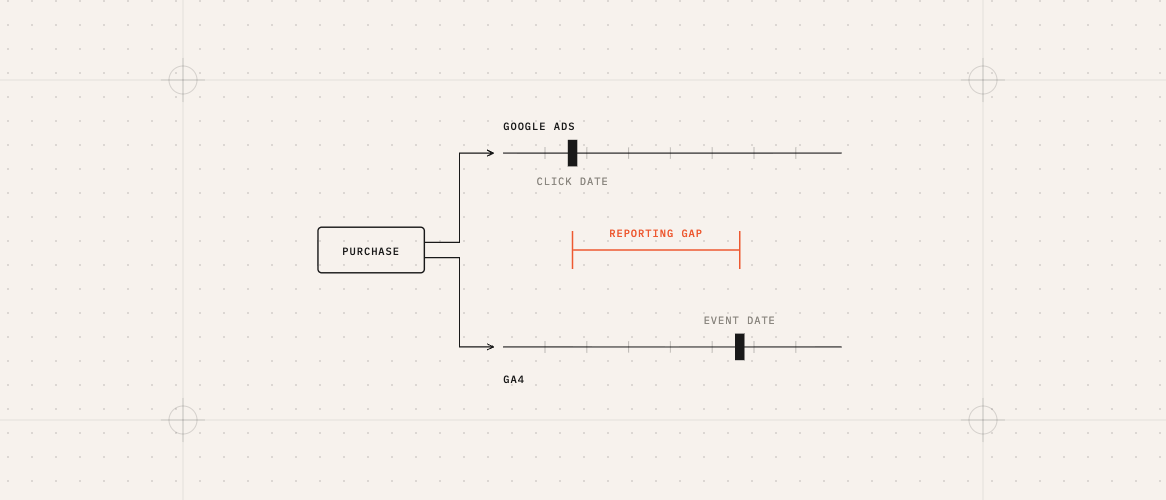
Say a customer clicks your ad on Monday, leaves, then comes back on Friday by typing your website name and buys. Google Ads may say the ad made that sale. Google Analytics may say the sale came from someone who came straight to your site. If the purchase falls within the ad’s conversion window, both are right from their own point of view.
They put the sale on different days
- Google Ads’ main Conversions column puts the sale on the day of the ad click (Monday in the example). The “by conv. time” columns put it on the purchase day.
- Google Analytics puts it on the day of the purchase (Friday).
If you compare just one day or one week, the numbers can look further apart than they really are. Data can also take 24–48 hours to settle.
Setup mistakes that make the gap bigger
- Counting the same sale twice. Google Ads is told about a sale from two places at once, so it doubles the number.
- The two accounts are not connected, or they are connected to the wrong website.
- Tracking gets lost on the way. Some pages, forms, or checkout steps drop the information that tells Google a visitor came from an ad. Server-side tracking can reduce this.
- Cookie banners set up badly. When visitors say no to cookies, some tracking stops. If the banner is set up wrong, it can stop more than it should.
A simple checklist
- Make sure Google Ads and Google Analytics are linked to each other.
- In Google Ads, check that each sale or lead is only counted from one place.
- Compare the same dates, and use at least a few weeks, not one day.
- In Google Ads, use the “Conversions (by conv. time)” column. In Google Analytics, look only at visitors from google / cpc.
- Pick a few real orders or leads and check if both tools recorded them.
- Check that your cookie banner is not blocking more than it should.
Google explains how to link the two accounts in its Google Ads Help Center.
FAQ
Should the numbers ever match exactly?
Not usually. They count in different ways on purpose. You want a difference you can explain, not zero difference.
Which number should I trust?
Use Google Ads to judge your ads, because that is what it uses to improve them. Use your own sales records or CRM as the final word on what really came in.
Google Ads shows a lot more sales than Google Analytics. Is that bad?
It can mean the same sale is counted twice in Google Ads, so check that first. Also check the dates, the conversion window, and the time zone.
Can I fix this myself?
Some fixes are simple settings. Others need someone who knows how the tracking is built on your website.
If you want someone to find out exactly why your numbers don’t match, a conversion tracking audit checks how sales and leads are tracked across Google Ads, Google Analytics, and Meta, and gives you a clear list of what to fix.
Is your website losing the leads your ads pay for?
Free scan of one page, or the $49 Lead Leak Report for up to three.